Katherine oversees editorial operations across all six brands. Before joining The Meridan Group, she spent 14 years at the Minneapolis Star Tribune, where she led the metro desk through its digital transformation. She holds a Master's in Journalism from Northwestern's Medill School.
Native
UI
components
for
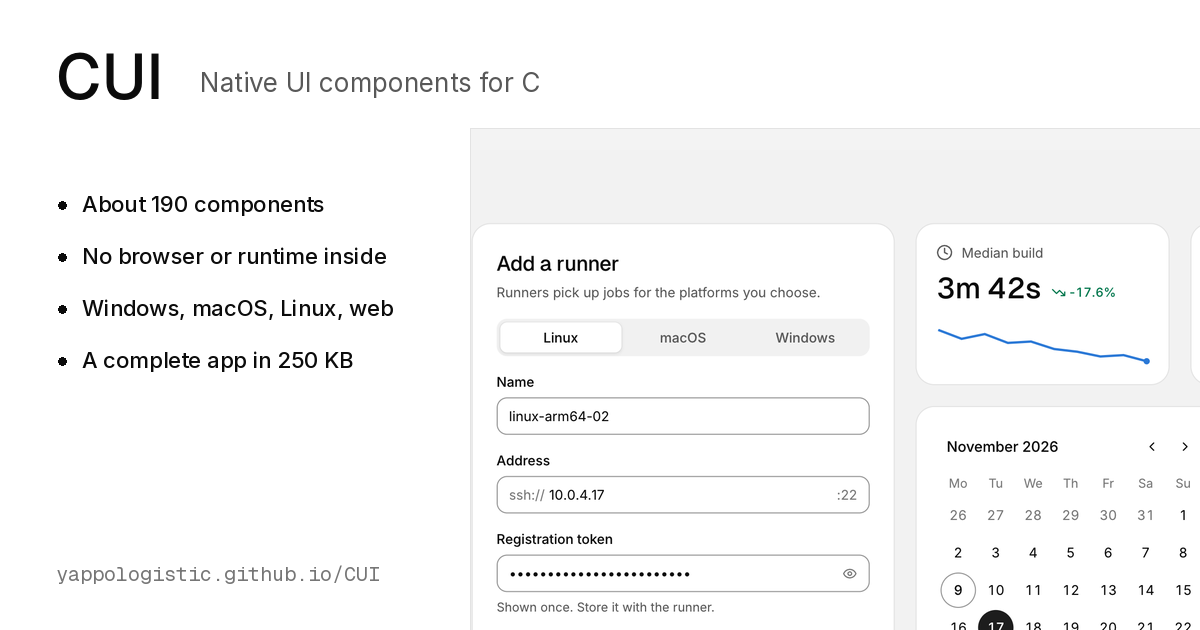
About 190 components, compiled to machine code with no browser or runtime inside. Windows, macOS, Linux and the web, from one C99 codebase.
Get started
Browse components
$
git clone https://github.com/yappologistic/CUI
Overview
Editor
Data
Planning
Assistant
Charts
Preview
Code
~190
components
~250 KB
a complete app
< 0.25 ms
per frame
Win · Mac · Linux · Web
one C99 codebase
0
dependencies
01
Everything a desktop app needs
Not a box of primitives: complete components, designed together, that look finished without styling. Each tile below is running; click into one and use it.
Browse all components
Data grid
Thousands of rows, sorting, filters and spreadsheet selection.
Docs
Command palette
Fuzzy search with groups and shortcuts.
Docs
Node editor
Pan, zoom and wire nodes together.
Docs
Property inspector
Typed editors in folding groups.
Docs
Charts
Lines, bars, donuts and a dozen more.
Docs
Chat
Bubbles, replies and reactions.
Docs
02
Your interface is plain C
Components are functions that draw themselves and return what happened. Your variables are the state, and the whole screen is described again every frame, so there is nothing to keep in sync.
How immediate mode works
#include
#include
int
main(
void
) {
cui_app *app =
cui_app_create
(&(cui_app_desc){
.title
=
"My app"
});
if
(!app)
return
1
;
bool
notify =
true
;
int
clicks =
0
;
while
(
cui_app_frame
(app)) {
cui_ctx *ui =
cui_app_ui
(app);
cui_column
(ui,
.pad
=
24
,
.gap
=
12
) {
cui_heading
(ui,
"Welcome"
,
2
);
cui_switch
(ui,
"Email me when a build fails"
, ¬ify);
if
(
cui_button
(ui,
"Count"
,
.variant
=
CUI_BUTTON_PRIMARY
)) clicks++;
cui_textf
(ui,
"Clicked %d times"
, clicks);
}
}
cui_app_destroy
(app);
return
0
;
}
03
Make it yours
Light and dark, eight accents, and semantic tokens your own drawing follows too. Try them on a live page of components.
Theming
Light
Dark
Preview
Code
04
Small, fast and careful
Native apps should start instantly and stay out of the way. These are the numbers and rules CUI is held to.
Design principles
0.1 to 0.25 ms a frame
A full screen builds, lays out and paints in a fraction of a millisecond. An idle app uses no CPU.
About 250 KB
That is a complete app, window and fonts included. CUI draws its own components, so there is no browser, no runtime and no dependency to ship.
Win32, Cocoa and X11
Or SDL2 and GLFW, drawn with OpenGL or the software renderer. The core only emits triangles, so your own renderer works too.
Keyboard and reduced motion
Controls take Tab, Enter, Space and the arrow keys, and each component page lists its keys. Every animation has a reduced motion path, and text meets 4.5:1 contrast.
05
Learn it in an afternoon
Six short guides take you from your first window to your own components and your own renderer.
Start with the first guide
01
Getting started
Build CUI, open a window and learn the frame loop.
Read
02
Layout
Rows, columns, sizes, grids, scrolling and split views.
Read
03
Theming
Light and dark, eight accents, tokens, fonts and motion.
Read
04
Custom components
Draw your own components with the same tools.
Read
05
Integration
Bring your own window, input and renderer.
Read
06
Design principles
The rules every component follows.
Read
Start with one window
Build CUI, open a window and draw your first components in a few minutes.
Get started
Source on GitHub
Photograph: Ansel Adams,
The Tetons and the Snake River
, 1942. U.S. National Archives, public domain.